REVIEW · NARITA
Japan Unlimited WiFi Router – Narita Airport Pickup
Book on Viator →Operated by Vision Inc. · Bookable on Viator
Getting online fast at Narita saves stress. This Japan Unlimited Wi‑Fi Router Hotspot is built for people who land at Narita and want maps, messaging, and translation right away—without hunting for a SIM card. You pre-rent it, then grab the router at Terminal 1 or Terminal 2 at the airport.
I especially like the included power bank plus the practical, ready-to-use kit (router, USB cable, adapter, and power bank). Second, I like that it’s 4G LTE Wi‑Fi, so you can stay connected around Japan while you’re walking, riding trains, and planning on the move.
One thing to watch: high-speed data is limited to 3GB per day, and the materials mention a device limit that can vary (up to 10 in one section, up to 5 in another). Plan around that, and you’ll avoid frustration.
In This Review
- Key things to know before you rent
- Why an unlimited 4G LTE hotspot helps on your first hours in Japan
- Narita pickup at Terminal 1 or 2: how to keep arrival stress low
- What’s in the box and what setup feels like in practice
- Data limits: the 3GB-per-day cap and what it means for you
- Using the router across Japan: Maps, trains, and day trips that go smoother
- Returning it without hassle: the one mistake to avoid
- Is $15.85 good value for Narita airport Wi‑Fi?
- Who this Narita Wi‑Fi router is best for (and who should rethink it)
- Should you book this Narita unlimited Wi‑Fi router?
- FAQ
- Where do I pick up the Wi‑Fi router at Narita?
- How long can I rent the unlimited Wi‑Fi router?
- Is the Wi‑Fi truly unlimited?
- How many devices can I connect?
- What’s included with the rental?
- What’s the cancellation policy?
Key things to know before you rent
- Narita pickup at Terminal 1 or 2: counters are outside security, so you can handle it in the public airport area.
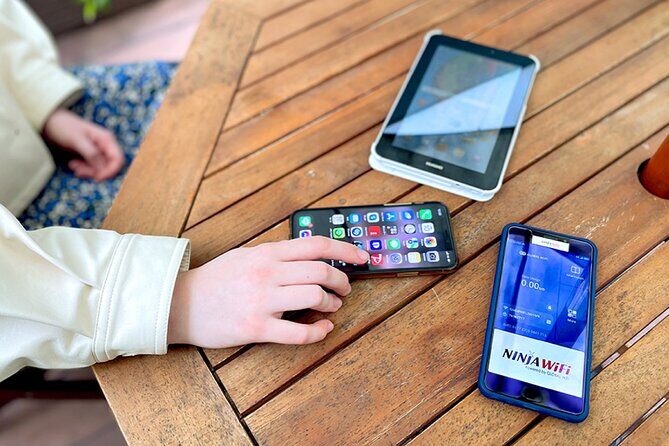
- A full “land-and-go” kit: router, USB cable, adapter, plus a power bank.
- 4G LTE Wi‑Fi for Japan travel: designed for online navigation while you move between cities.
- Daily speed cap matters: high-speed data is limited to 3GB per day.
- Multi-device use has limits: materials cite up to 10 devices in one place, up to 5 at once in another.
- Small group setting: maximum of 10 travelers, which can help the pickup feel smoother.
Why an unlimited 4G LTE hotspot helps on your first hours in Japan
For a lot of Japan trips, the first day is the hardest. You’re landing, figuring out trains, finding your hotel, and trying to read station signs before your jet lag kicks in. Having internet from the jump turns that chaos into something you can actually manage.
This rental is set up for 4G LTE Wi‑Fi, which means you’re not just relying on weak airport connections or hunting for free Wi‑Fi passwords. You can use Google Maps for station-to-station navigation, check transit changes, and keep your plans flexible when something takes longer than expected.
The other big advantage is that it’s not just about data. It’s about reducing the number of steps you have to think through on landing day. With the router kit in your hands, your phone can stay useful for directions, reservations, and translating simple signs—so you can spend your attention on the sights instead of your network settings.
A few more Narita tours and experiences worth a look


Narita pickup at Terminal 1 or 2: how to keep arrival stress low
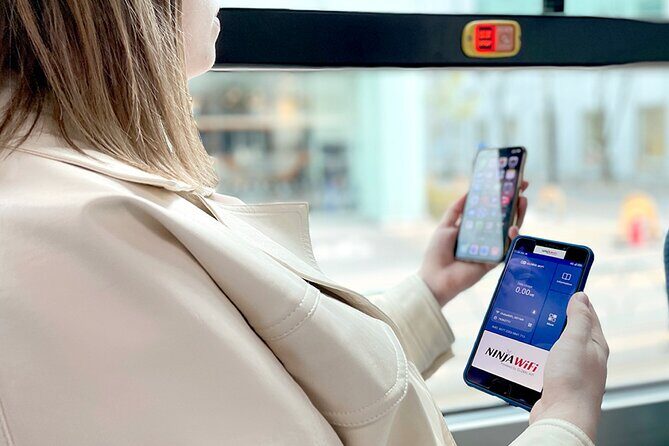
The pickup piece is where this kind of rental either saves you time or costs you time. The good news: the pickup and return counters are located outside airport security, which typically makes it easier to handle quickly after you arrive. You don’t need a separate airport-security plan just to get connected.
You can pick up at Narita International Airport, either at Terminal 1 or Terminal 2. That flexibility matters if your flight lands at one terminal but your arrival flow feels confusing. If you already know which terminal you’re arriving to, you can keep things simple and aim for that counter.
Also, it’s described as being near public transportation. In practical terms, that means you’re not trying to drag your luggage into some far-off part of the airport just to collect the router. Less walking with a heavy bag is always a win.
One more detail that helps: the rental uses a mobile ticket and you receive confirmation at the time of booking. Bring that confirmation up on your phone so you’re not hunting through emails mid-lines.
What’s in the box and what setup feels like in practice

This rental includes everything you’re told you’ll need: the Wi‑Fi router, a USB cable, an adapter, and a power bank. That matters because many “cheap” airport internet options force you to solve your own tech problems on day one. Here, you’re getting the basics to power the device, then keep your phone charged while you use it.
The power bank is a particularly practical add-on. During travel, your phone battery can drain fast when you’re running Maps, translation apps, and camera features for photos. Having a backup power source can keep you from planning your day around charging stations.
Setup is also the type of straightforward system you want after a long flight. The goal is that you turn the router on, connect your phone (and other devices), and start navigating. In other words, you’re not signing up for a complicated tech project at 8 p.m. after landing.
One small reality check: even though the materials describe connecting up to 10 devices in one section, the provider description also states the router can connect up to 5 devices at once. If you’re traveling as a family or with multiple devices, treat that as a heads-up to avoid trying to run a crowd through the same hotspot. You’ll get better results by keeping the number of active devices reasonable.
Data limits: the 3GB-per-day cap and what it means for you

The big phrase in the marketing is unlimited. The key detail is how unlimited works here: high speed data is limited to 3GB per day. That’s the part you should actually plan around.
So what does 3GB/day mean for a normal trip? If you use Maps constantly, check messages, stream a few videos, and upload photos, you could hit the cap earlier than you’d expect. If your internet use is more moderate—mostly navigation, messaging, and occasional browsing—you’ll probably be fine.
Here’s a practical approach: decide what you need the most while you’re out. For many people, the true value of a router is navigation. If you mainly use it for Maps and communication, you’re buying back time and confidence. You’re not necessarily using it like home broadband for hours of streaming.
Also, the daily cap is per day, not per trip length. That means longer trips give you more total days of high-speed use, but every single day has that same ceiling. If you plan to binge video calls or heavy streaming while sightseeing, budget for more download-friendly moments back at your hotel Wi‑Fi (if available).
Finally, keep an eye on device count. More connected devices can mean slower performance. Since the materials list different device limits, it’s smart to run it like a small shared network: keep your “must-use” devices connected, and disconnect anything you aren’t actively using.
Using the router across Japan: Maps, trains, and day trips that go smoother

Once you’re connected, the router turns your phone into a travel dashboard. That’s where you really notice the difference versus relying on intermittent Wi‑Fi.
You can check Google Maps, which is the biggest lifesaver in Japan because station layouts can be complex and route options can change. You can also use social apps like Facebook and Instagram, watch YouTube videos, and do everyday browsing while you move through cities.
Even if you’re not a heavy data user, having instant access is still valuable. It helps you:
- confirm train connections and platform details,
- re-check routes if you accidentally take a wrong exit,
- look up restaurant hours or museum closing times on the fly,
- find translation support when signage doesn’t match what you expected.
The point isn’t that you’ll live online. It’s that you can correct course fast. In Japan, that speed helps. You’re rarely stuck for long, but you can waste time if you’re waiting to reconnect.
Also, the rental is designed for travel around Japan, with the expectation that 4G LTE Wi‑Fi coverage keeps you online while you travel. So it’s useful not just in Tokyo, but also when you’re doing day trips or moving between regions.



Returning it without hassle: the one mistake to avoid

At the end of your rental, you return the router at the airport pickup and return counters. The counters are in the same general “outside security” area, which makes the final process feel less intimidating than returning something inside a secured zone.
There’s one clear caution: refunds will not be provided for not collecting the Wi‑Fi router. That’s the kind of rule that can sting if you assume delivery, misread your pickup instructions, or miss the pickup window.
So here’s the smart move: treat pickup as the main plan, not an optional step. When you land, focus on getting to the counter and collecting the device. If you’re tempted to make a different arrangement, verify your instructions carefully. For this rental, the reliable approach is the airport counter.
If you want less stress, keep the confirmation message handy and plan a little buffer time. Japan airports move fast, but lines still happen. A few extra minutes can save you from last-minute scrambling.
Is $15.85 good value for Narita airport Wi‑Fi?

The price listed is $15.85 per person, with rentals that run from 3 to 30 days. Even without a breakdown per day, the value here is pretty clear: you’re paying for certainty. Certainty is expensive when you’re jet lagged and standing at a station.
If you’ve ever landed and realized you have no working internet, you know what that costs. You might lose time searching for a signal, trying to verify routes, or waiting until you find a café or hotel Wi‑Fi. This rental is meant to prevent that first-day slowdown.
Think of it like a convenience bundle:
- You get connected immediately after pickup.
- You get a power bank to keep your phone alive.
- You get a kit designed for use on arrival day.
That doesn’t mean it’s perfect for everyone. The 3GB/day high-speed cap is the tradeoff. If you plan to stream heavily or use lots of data all day, a cap can be annoying. But if you use internet mostly for navigation and messaging, the cap is less likely to ruin your trip.
Also, your cost stays simple. You’re not buying multiple short-term options or relying on airport freebies that come and go. For many people, that simplicity is the real value.
Who this Narita Wi‑Fi router is best for (and who should rethink it)

This rental is a strong fit if you:
- land at Narita and want internet right away,
- care more about maps, messaging, and practical travel tools than heavy streaming,
- prefer an airport pickup you can handle in the public area outside security,
- want an all-in-one kit with a power bank.
It may be less ideal if you:
- plan to run many devices at once and expect unlimited performance,
- need huge data use every day due to the 3GB/day high-speed limitation,
- are likely to miss the airport pickup step and hope for an alternative.
One more practical note: the materials describe a maximum of 10 travelers. That doesn’t guarantee a short line, but it suggests the operation is built to handle pickups without huge group chaos.
Should you book this Narita unlimited Wi‑Fi router?
Book it if you want the easiest path to being online from the moment you land. The combination of Narita Terminal 1 or 2 pickup, a ready kit, and a power bank is exactly what helps on first-day travel.
Hold off or choose another option if your trip style is data-heavy every day. The 3GB per day high-speed rule is the deciding factor. If your plan includes lots of video streaming or large uploads while out and about, you’ll probably feel the limit.
My practical call: if you want get your bearings fast internet, this is worth it. If you want unlimited high-speed data all day, this isn’t that deal.
FAQ
Where do I pick up the Wi‑Fi router at Narita?
You pick up (and return) at counters located outside airport security at Narita International Airport, with pickup available at Terminal 1 or Terminal 2.
How long can I rent the unlimited Wi‑Fi router?
The rental duration is listed as 3 to 30 days.
Is the Wi‑Fi truly unlimited?
The rental is described as unlimited Wi‑Fi, but high speed data is limited to 3GB per day.
How many devices can I connect?
One part of the info says the hotspot can connect up to 10 devices, while the provider description says it can connect up to 5 devices at once.
What’s included with the rental?
The kit includes the Wi‑Fi router, USB cable, adapter, and a power bank.
What’s the cancellation policy?
You can cancel for a full refund if you cancel up to 24 hours in advance of the experience start time, based on local time.