REVIEW · TOKYO
Japan: eSIM with Unlimited Local 4G/5G Data
Book on GetYourGuide →Operated by LINK KOREA · Bookable on GetYourGuide
Japan without swapping SIM cards is a win. This Japan eSIM with unlimited 4G/5G data taps into the KDDI au network, and you set it up by scanning an eSIM QR code for quick connection. I also like that you get a choice: Ultra (unthrottled) or Lite (speed-capped) based on how long you’re staying.
One thing to plan around: the QR code for the eSIM is emailed separately about a day before your date, and the plan connects to the local network only after you’ve arrived in Japan. If you’re the type who installs everything the night before, you’ll need to follow that timing.
In This Review
- Key Points Before You Buy
- Why This Japan eSIM Feels So Easy on KDDI au
- Ultra vs Lite: Pick the Speed That Matches Your Style
- Before You Go: Check eSIM Compatibility and Unlock Status
- The QR Code Trap: Voucher QR vs Real eSIM QR
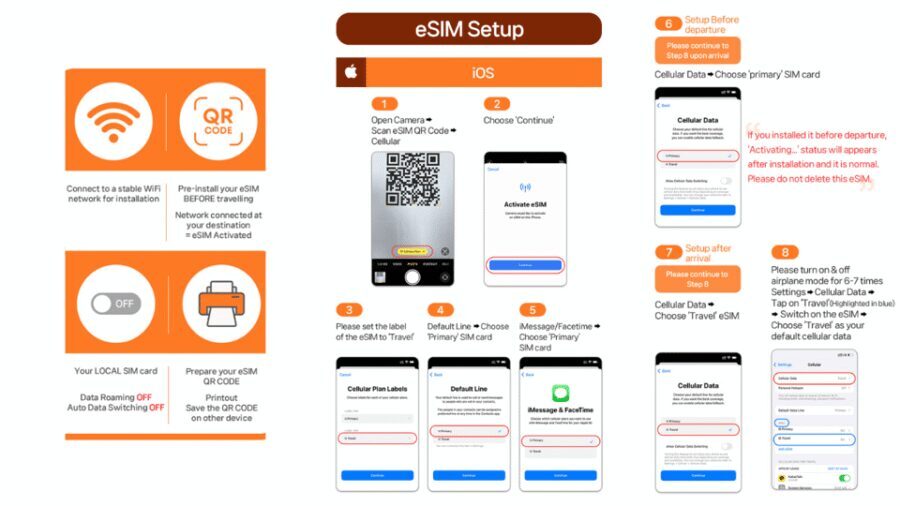
- Arriving in Japan: Installing the eSIM and Getting Online
- Using Unlimited Data Without Surprise: 5G vs 4G Switching
- Hotspot Tethering: Great for Extras, With Caps
- Voice and SMS: Know What’s Missing
- If Installation Fails: What to Do When QR Code Is Invalid
- Value Check: Does $10 Make Sense for Unlimited Japan Data?
- Who This eSIM Suits Best (And Who Should Think Twice)
- Should You Book This Japan eSIM Plan?
- FAQ
- Is the QR code on my voucher the eSIM QR code?
- When will the eSIM connect to the local network?
- How do I check if my phone supports eSIM?
- My screen says the QR code is invalid. What should I do?
- How do Ultra and Lite differ?
- Does the plan include voice calls and SMS?
- Can I use the plan for hotspot sharing?
- How are days counted for usage on the Lite plan?
- How long is the eSIM QR code valid?
- Are refunds accepted after the eSIM QR code is sent?
Key Points Before You Buy
- KDDI au coverage in Japan: local network access, not a patchwork connection plan.
- Two speed tiers: Ultra is described as unthrottled, while Lite caps max speed at 10Mbps.
- QR code delivery timing matters: voucher QR isn’t the eSIM QR; the real one arrives by email.
- Hotspot works with limitations: tethering is supported, but with caps that depend on the plan length.
- Fast troubleshooting path: if a QR code won’t install, you can check whether a new eSIM shows in your SIM/eSIM manager.
Why This Japan eSIM Feels So Easy on KDDI au
The big appeal here is simplicity. You’re not hunting down a SIM counter or fighting with tiny cards. Instead, you scan the eSIM QR code, install it, and then use local unlimited 4G/5G data across Japan.
Because it’s local-network based (KDDI au), your phone behaves more like it’s back home—maps load fast, messaging apps work smoothly, and you’re less likely to feel like you’re on a “travel data” lifeboat.
The practical upside for your trip: you can plan in real time. That means fewer offline downloads, less guessing, and less time spent hovering over Wi-Fi signs.
You can also read our reviews of more tours and experiences in Tokyo.



Ultra vs Lite: Pick the Speed That Matches Your Style
This plan splits into two versions, and the differences are clear enough to make your decision easy.
Ultra is unlimited 5G/4G local data with no throttling stated. It’s the better choice if you stream, upload, use navigation constantly, or just don’t want to think about speed caps.
Lite is also unlimited 5G/4G local data, but max data speed is limited to 10Mbps. For light-to-moderate use—maps, social posting, messaging, and browsing—Lite can be a smart value. If you rely heavily on video or large uploads, Ultra is the safer bet.
Duration also differs:
- Ultra: 3 to 30 days
- Lite: 3 to 10 days
If you’re doing a short visit, Lite may fit your budget. If your trip stretches out, Ultra gives you more runway.
Before You Go: Check eSIM Compatibility and Unlock Status
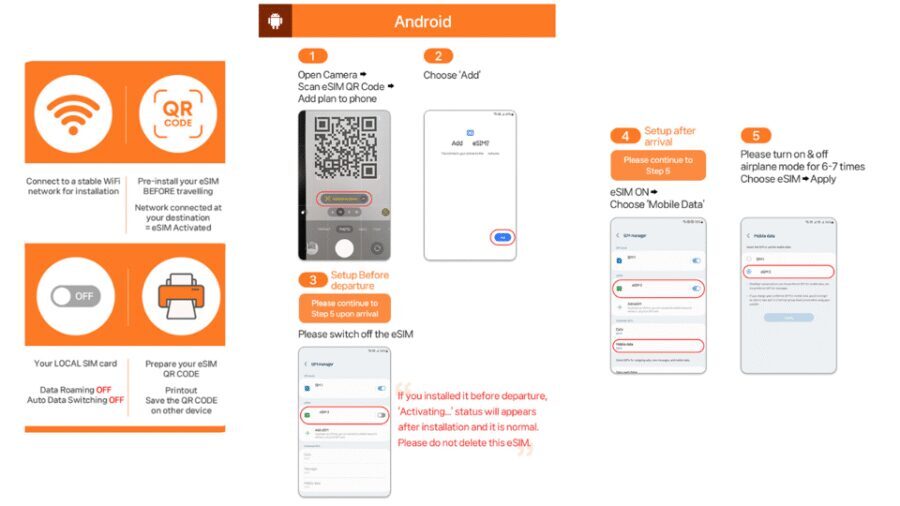
Before you buy, verify two things. This is the part that prevents most headaches later.
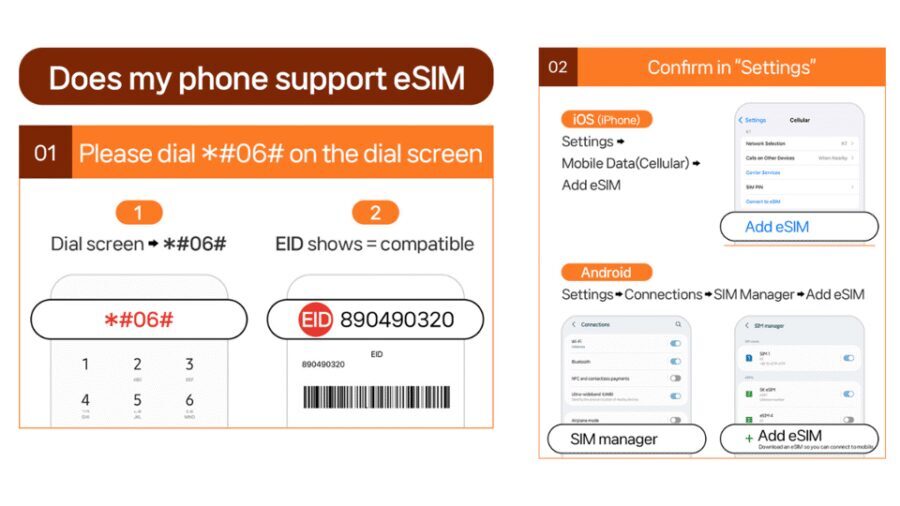
First, make sure your phone supports eSIM. You can check by dialing #06# and seeing whether EID shows. If EID doesn’t show, your device is likely incompatible.
Second, make sure your phone is unlocked for a foreign SIM/eSIM. If it’s carrier-locked, installation can be a dead end even if the eSIM QR code is correct.
Also note the QR code timing: the QR code that matches your eSIM is delivered via email about 1 day before the activity date. That means you should not wait for the airport Wi‑Fi to do the setup.
The QR Code Trap: Voucher QR vs Real eSIM QR
Here’s a detail worth treating like a checklist item.
The QR code shown on your voucher is not the actual eSIM QR code. The real eSIM QR code is sent separately by email. So if you scan the voucher code and it doesn’t behave like an eSIM installer, you’re not doing something wrong—you’re using the wrong QR code.
This can be confusing because both look like QR codes. But once you know the rule, you can move fast:
- Ignore the voucher QR for installation
- Watch your email for the actual eSIM QR code
- Install it on your phone once you’re set up to connect after arrival in Japan
Arriving in Japan: Installing the eSIM and Getting Online
The plan is designed so that the eSIM connects to the local network after you arrive in Japan. That matters because it changes your timing.
Instead of installing and immediately expecting data the moment you open the email, you should think of it like this:
1) Install the eSIM on your phone
2) Wait until you’re in Japan
3) Connect so it can attach to KDDI au
There’s also a validity rule: the eSIM QR code must be installed and activated within 30 days of purchase. That’s long enough for most trips, but it’s still not something you want to forget for months.
Once connected, you should see local network service and be able to use unlimited 4G/5G data right away.






Using Unlimited Data Without Surprise: 5G vs 4G Switching
You’ll get unlimited local data, but the network can still change the way your phone behaves. The plan notes that 5G signal can be affected by your location—indoors, underground, or in crowded areas—so your phone may switch to 4G.
This isn’t a deal breaker. It’s how mobile networks work. The practical thing to remember is that your experience will depend on your physical environment:
- Underground or inside buildings: expect possible 4G
- Open-air streets and above-ground areas: 5G may show up more often
A helpful bit of real-world reassurance: people have reported solid performance even on the subway. So if your itinerary includes getting around by train, you’re not gambling blindly.
Hotspot Tethering: Great for Extras, With Caps
If you travel with a laptop, an extra phone, or a tablet, hotspot can save you. This plan supports hotspot sharing, but there are limitations depending on the option you choose.
The good news is that tethering is part of the package. The caution is that hotspot uses caps. The plan lists hotspot limits by duration, such as:
- 3- and 4-day: 3GB
- 5-day: 4GB
- 6-day: 5GB
- 7-day: 6GB
- 8-day: 7GB
- 9-day: 8GB
- 10-day: 9GB
- 15-day: 15GB
- 20-day: 19GB
- 30-day: 30GB
So, if you plan to rely on hotspot for your biggest tasks (video calls, heavy uploads, streaming on a laptop), keep an eye on your tethering usage. If you only need it for occasional check-ins, it should fit fine.
Voice and SMS: Know What’s Missing
This eSIM includes data only. Voice calls and SMS messaging are listed as N/A.
For you, that means:
- You should use WhatsApp, Line, iMessage/FaceTime equivalents, or other data-based options for communication
- If you depend on SMS for verification codes (banking or certain travel services), you’ll want a backup plan like Wi‑Fi access and any already-configured apps that don’t require SMS
It’s a small detail, but it’s one that can save real stress once you’re in Japan.
If Installation Fails: What to Do When QR Code Is Invalid
When a QR code doesn’t install, don’t panic. Use the steps the plan provides.
If you see a message like QR code is invalid:
1) Go to your phone’s settings and check whether a new eSIM appeared.
- iOS: Settings > Cellular
- Android: Settings > Connections > SIM Manager
2) Confirm whether that eSIM profile shows up there.
Then, if it still won’t work, contact the supplier directly using the supplier email or WhatsApp. The provider listed is LINK KOREA, and the troubleshooting guidance points you toward their direct support rather than guessing.
This is a good workflow because the SIM/eSIM manager view tells you whether the QR install actually registered, even if you didn’t get instant confirmation.
Value Check: Does $10 Make Sense for Unlimited Japan Data?
At $10 per person, the value is strong if you’ll actually use your data daily. Unlimited data is not just comfort; it’s time saved. You won’t need to hunt Wi‑Fi for:
- navigation
- route changes
- ride-hailing / transit updates
- last-minute tickets and info
You’ll also avoid the friction of physical SIM pickup. That convenience is part of the price.
The real question is how you’ll use it:
- If you need data all day, unlimited makes sense.
- If you only check maps occasionally, you might still prefer it for simplicity, but you’ll want to weigh it against alternative shorter data options.
Also remember the difference between Ultra and Lite. If you’re a heavier user, Ultra’s no-throttling approach is likely worth it. If you’re mostly browsing and navigating, Lite can keep the budget under control.
Who This eSIM Suits Best (And Who Should Think Twice)
This is a great fit if you:
- want unlimited data across Japan without getting a physical SIM
- travel with a modern phone that supports eSIM and you know it’s unlocked
- rely on maps and messaging while moving around
It may be less ideal if you:
- need voice calls and SMS from your Japan number (since it’s data only)
- don’t want to manage eSIM timing (QR code arrives by email about a day before your date)
- plan to tether heavily to a laptop every day (hotspot has caps)
One more practical point: if your trip is extremely short, Lite’s range (3–10 days) lines up nicely. If you’re staying longer, Ultra gives you more flexibility.
Should You Book This Japan eSIM Plan?
I’d book it if your priority is staying online fast and simply, with local KDDI au access and truly unlimited data. The Ultra/Lite choice is also a smart touch because it matches how most people actually use phones in Japan.
I’d hesitate only if you’re worried about SMS/voice needs, or if you’re the kind of person who forgets to check email ahead of time. The QR code workflow is the one place you can mess up, so keep an eye on that email and get your eSIM ready when you arrive.
If your phone supports eSIM and is unlocked, this plan is an easy way to get moving and get your bearings fast—without turning your trip into a SIM scavenger hunt.
FAQ
Is the QR code on my voucher the eSIM QR code?
No. The QR code on the voucher is not the eSIM QR code. The eSIM QR code is delivered to you separately via email about 1 day before the activity date.
When will the eSIM connect to the local network?
The eSIM connects to the local network after you have arrived in Japan.
How do I check if my phone supports eSIM?
Dial #06# and check whether EID shows. If it doesn’t show, your device likely isn’t compatible with eSIM.
My screen says the QR code is invalid. What should I do?
Check whether a new eSIM appears in your phone settings:
- iOS: Settings > Cellular
- Android: Settings > Connections > SIM Manager
Then contact the supplier via their email or WhatsApp if it still won’t work.
How do Ultra and Lite differ?
Ultra is unlimited 5G/4G local data with no throttling stated. Lite is unlimited 5G/4G local data with a max data speed of 10Mbps.
Does the plan include voice calls and SMS?
No. Voice and SMS are listed as N/A.
Can I use the plan for hotspot sharing?
Yes. Hotspot is supported, but with limitations depending on the selected plan.
How are days counted for usage on the Lite plan?
Usage is calculated based on calendar days starting from the first connection to the KDDI (au) network in Japan. For example, activation at 10 PM Japan time counts as 1 full day by midnight.
How long is the eSIM QR code valid?
The eSIM QR code must be installed and activated within 30 days of purchase.
Are refunds accepted after the eSIM QR code is sent?
No. Refunds will not be accepted once the eSIM QR code has been sent.