REVIEW · TOKYO
Unlimited WiFi Router – Haneda Airport (Tokyo) Pickup
Book on Viator →Operated by Vision Inc. · Bookable on Viator
Landing in Tokyo with Wi-Fi matters more than people think. This Haneda Airport pickup lets you start using a 4G LTE unlimited router right after you arrive, with a power bank and the basics in the box. It’s designed for Japan trips where you rely on maps, messaging, and the occasional YouTube break.
I especially like the straightforward handoff: you head to the NINIJA Wi-Fi counter in the arrivals area, show your details, and get set up without wandering around. I also like the included power bank and accessories, because you are not hunting for chargers in your first hour in Tokyo. One thing to watch is the high-speed limit of 3GB per day, so heavy video users may feel a slowdown after the daily cap.
In This Review
- Key Points to Know Before You Go
- Entering The Haneda Arrivals Lobby: Getting Connected Without a Detour
- What You Actually Get: The NINIJA 4G LTE Unlimited Router Kit
- The Daily 3GB Speed Cap: The One Detail That Changes How You Use It
- Power Bank and Battery Reality: Why This Kit Starts Working Fast
- Picking Up vs Returning at Haneda: How to Avoid the Common Confusion
- How Good Is the Connection for Tokyo Activities Like Theme Parks?
- Price and Value: When This Rental Makes Sense
- Who This Is Best For (and Who Should Consider Alternatives)
- Should You Book This Haneda Wi-Fi Router Pickup?
- FAQ
- What are the pickup hours at Haneda for this Wi-Fi router?
- Where do I pick up and return the router at Haneda?
- Is the data unlimited, and is it always high speed?
- How many devices can connect to the router?
- What’s included in the rental kit?
- Can I cancel for a full refund?
Key Points to Know Before You Go

- Haneda pickup outside security: counters are in the arrivals lobby area, so you can grab it after landing
- 4G LTE unlimited usage, with a daily speed limit: high-speed data is capped at 3GB/day
- Long rental window: the router can last up to 90 days, and your booking typically runs 3–30 days
- Connect multiple devices: the info says up to 10 devices, while another section says up to 5 at once
- Return is planned for both day and late flights: there’s a return box option during overnight hours
Entering The Haneda Arrivals Lobby: Getting Connected Without a Detour
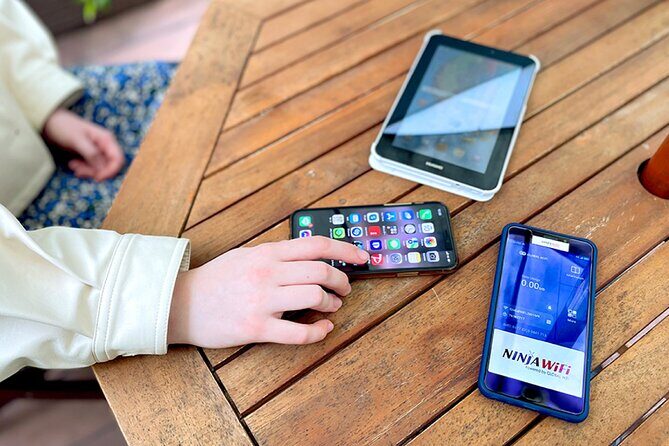
This experience is built for a simple mission: get you online fast after you land. Your pickup window runs from 6:45am to 11:45pm, and the pickup is at Haneda Airport at the arrivals terminals. The biggest practical win is that you do not need to go into the terminals you might be used to. You collect it where you naturally exit the plane and start your airport walk.
Look for the NINIJA Wi-Fi counter at the arrivals level. Terminal 3 uses a counter labeled Global WiFi x NINJA WiFi, with hours shown as 06:30 to 23:45. If you arrive late, there’s also a return box option for overnight timing. Terminal 2 has its own counter setup, and the hours listed there are 6:00 to 23:00, with a return box at Terminal 2, 2F arrivals lobby.
In plain terms, you will want to do two things right away after pickup: power it on and test your connection. The faster you confirm it’s working, the less time you spend later wrestling with settings while you are tired from travel.
A helpful detail from real-world use is that pickup can feel very quick and low-stress when you have your documents ready. The process is described as showing your reservation form and passport and receiving instructions on the spot. Also, there’s no need to play hide-and-seek through airport signage if you know what you are looking for: the specific NINIJA counter name and the terminal you’re in.
You can also read our reviews of more tours and experiences in Tokyo.



What You Actually Get: The NINIJA 4G LTE Unlimited Router Kit

You are not just renting a router and calling it a day. This kit is meant to keep you functional through your first days in Tokyo and beyond. The included items listed are the Wi-Fi router, a USB cable, an adapter, a Wi-Fi pouch, and a power bank. You are basically set up for the full “land, connect, move” phase of the trip.
The connection technology is 4G LTE, and it’s intended for Japan-wide use while you travel around. The data description is simple: unlimited usage, with a daily high-speed limit. That means your device should stay connected even if you use it a lot, but your speed may drop after you hit the daily threshold.
Another practical note: the booking uses a mobile ticket, and you receive confirmation at booking time. When you’re landing with jet lag, that matters. You want a rental that doesn’t turn into a scavenger hunt involving websites, logins, or long instructions mid-travel.
Also, the rental length is broad. Your trip duration is typically 3 to 30 days, and the router itself can be used for up to 90 days. This setup makes sense if you’re traveling for a month or just want one device that can cover the whole Tokyo-and-beyond chunk of your itinerary.
The Daily 3GB Speed Cap: The One Detail That Changes How You Use It
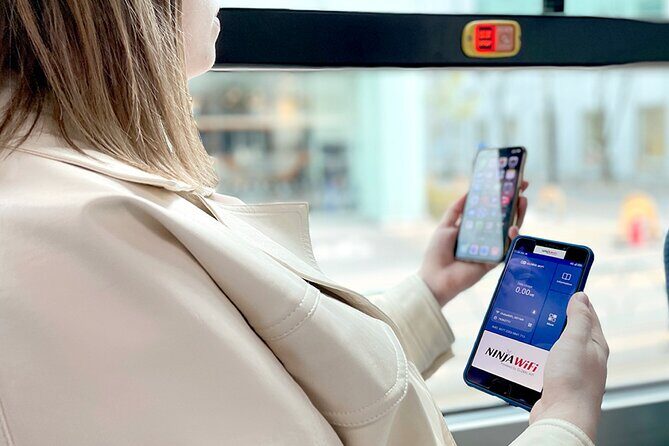
Here’s the rule that will shape your expectations: high-speed data is limited to 3GB per day. The word unlimited is doing real work here. It usually means you won’t get cut off. But the daily speed limit is what affects streaming, large downloads, and heavy map usage across long distances.
So what does that mean for you day-to-day?
- If you mostly use Google Maps, messaging, and general web browsing, you should be fine.
- If you plan on streaming YouTube for long stretches, expect to run into the cap sooner.
- If you use multiple devices at once, your experience after the daily limit can feel more noticeable.
There’s also a device limit detail that you should take seriously. One part of the information says the router can connect to up to 10 devices. Another section says the routers can connect to up to 5 devices at once. Since both are in the provided details, treat this like a “plan for the lower number if possible.” If you have a family with several phones and tablets, it’s smarter to assume the smoother experience is closer to 5 connected devices at a time.
If you want the practical best-case approach, use the router mainly for essential devices (phones for navigation and communications), and consider limiting high-bandwidth devices unless you know your daily usage pattern.
Power Bank and Battery Reality: Why This Kit Starts Working Fast

It’s easy to underestimate how quickly your phone battery disappears in an airport-to-subway day. This rental includes a power bank, plus the listed cables and adapter so you can charge without improvising.
In the feedback you provided, one key positive theme is that the device battery can cover a full day, so you don’t need constant charging mid-day. That’s a big deal when you’re walking, taking photos, and switching between transit and city time.
Here’s how I’d use the kit strategically:
- Charge the router when you pick it up, then let it run while you head into the city.
- Treat the power bank as your backup, not your main routine, unless you are actively charging your phone all day.
- When you get to your lodging, do one easy “first night check” so you know the setup is stable for the next morning’s commute.
Also, keep the Wi-Fi pouch with the router and accessories. It might seem like minor clutter control, but it saves you from losing the adapter or cable on day one.
Picking Up vs Returning at Haneda: How to Avoid the Common Confusion

Return days are where people get sloppy and then stress out. The good news: the return location is described as being in line with where you pick up, and the counters are in the arrivals area outside security.
One review note highlights a mapping confusion: the drop-off location map can be wrong, and you end up returning at the same location you picked up. That matches how many airport rentals work, where pickup and return are essentially the same counter/area depending on the time of day.
Timing matters because there are different counter hours and an overnight return box option. Terminal 3 lists a return box for 23:45 to 06:30. Terminal 2 has a similar concept, with a return box at Terminal 2, 2F. If your flight schedule is tight, plan to return during open hours if you can. If not, follow the return box option shown for your terminal.
A smart tip: before you leave the airport area, confirm the return instructions you received. Not every rental has identical procedures, and a 10-second check can prevent a 10-minute panic.




How Good Is the Connection for Tokyo Activities Like Theme Parks?

If you care about getting around Tokyo without stopping every time your phone loses signal, this type of 4G LTE hotspot is exactly the use case. The review info includes an example of connectivity during visits to Tokyo’s Disney parks, which is the kind of scenario where offline navigation becomes stressful.
For you, the big win is confidence. When your phone is your ticket reader, your map, your translator, and your messaging hub, you want stable access. Unlimited usage helps because you are not constantly checking whether you’ve burned through a data plan in a day.
Just remember the speed-cap reality. In high-traffic amusement or transit-heavy areas, you might already see phone network strain due to demand. Add streaming and big downloads and the 3GB/day high-speed limit becomes the more important factor.
Price and Value: When This Rental Makes Sense

The price you provided is $14.48 per person, with typical bookings made about 24 days in advance. For that cost, you’re buying convenience and coverage, not just a pile of gigabytes.
Here’s when the value is strong:
- You’re traveling for multiple days (3 to 30 is the typical range) and you want one device that covers the whole trip.
- You’re not relying on Wi-Fi at hotels, cafés, and malls.
- You have more than one person needing connectivity at the same time (the device limit guidance is the key factor here).
- You want to use Google Maps and messaging immediately after landing, without stopping at a kiosk later or negotiating a local setup.
Here’s when you might pause:
- If you only need light data for one phone and you already plan to use eSIM or your hotel Wi-Fi confidently, paying for the rental might feel like extra effort.
- If you plan to stream constantly, the daily high-speed limit means you are not buying “full speed forever,” even if usage is unlimited.
One honest way to decide is to compare your likely daily habits. If your trip includes lots of navigation and communication, this tends to be worth it. If it’s mostly in one neighborhood with reliable Wi-Fi, you might decide differently.
Who This Is Best For (and Who Should Consider Alternatives)

This pickup works best for:
- Families and small groups who want shared connectivity so everyone can map, message, and find each other fast.
- First-time visitors to Tokyo who will lean hard on Google Maps and transit directions.
- Anyone landing at Haneda who wants to skip the “where can I buy data right now” scramble.
You may want to consider a different approach if you’re mostly traveling solo, you’re staying somewhere with dependable Wi-Fi, and you are fine using an eSIM or your phone’s existing setup. In those cases, the rental can be more hassle than it is help.
Also, keep in mind the practical theme from the feedback: signage and counter-finding can be a factor. If you are arriving when it’s busy, arrive with your terminal and counter plan in mind. It will reduce the chances of getting stuck looking around.
Should You Book This Haneda Wi-Fi Router Pickup?
I think you should book it if you want a low-friction start to your Tokyo trip. The biggest reasons are the quick pickup in the arrivals area, the included power bank, and the idea that you can get online right after you land. For most people, that convenience outweighs the small complexities.
I would skip or rethink it if your plan is mostly Wi-Fi-dependent, or if you expect unlimited high-speed streaming regardless of daily usage. The 3GB/day high-speed limit is the trade-off. Another consideration is the device count detail that varies between sources; if you have a crowd of devices, plan around the lower number for smoother performance.
If you fall into the “I rely on my phone for navigation and I want to avoid surprises” group, this is a solid, practical booking.
FAQ
What are the pickup hours at Haneda for this Wi-Fi router?
The pickup window is listed as 6:45am to 11:45pm. Terminal-specific hours are also provided: Terminal 3 shows 06:30–23:45 for the counter, and Terminal 2 shows 6:00–23:00.
Where do I pick up and return the router at Haneda?
Pickup and return counters are outside airport security in the arrivals areas. Terminal 3 uses the Global WiFi x NINJA WiFi counter in the 2F Arrivals Lobby, and it also mentions a JAL ABC counter/return box for overnight. Terminal 2 uses the J WiFi & Mobile x Global WiFi counter in Terminal 2, 2F.
Is the data unlimited, and is it always high speed?
Usage is described as unlimited, but high-speed data is limited to 3GB per day.
How many devices can connect to the router?
One part of the information says it can connect up to 10 devices, while another section says up to 5 devices at once. To be safe, plan around the lower number for smoother performance.
What’s included in the rental kit?
It includes the Wi-Fi router, a USB cable, an adapter, a Wi-Fi pouch, and a power bank.
Can I cancel for a full refund?
Yes. You can cancel up to 24 hours in advance for a full refund. If you cancel less than 24 hours before the start time, the amount paid is not refunded.